Agentic SDLC

Agents run the SDLC.
Your team stays in control.

It reads your codebase and your documents, then turns one requirement into a PRD, tickets, branches, tests and a pull request — in one workspace your whole team shares.

✓ Your repository, your Git workflow ✓ Bring your own model keys ✓ Agents run in isolated sandboxes ✓ Private deployment available
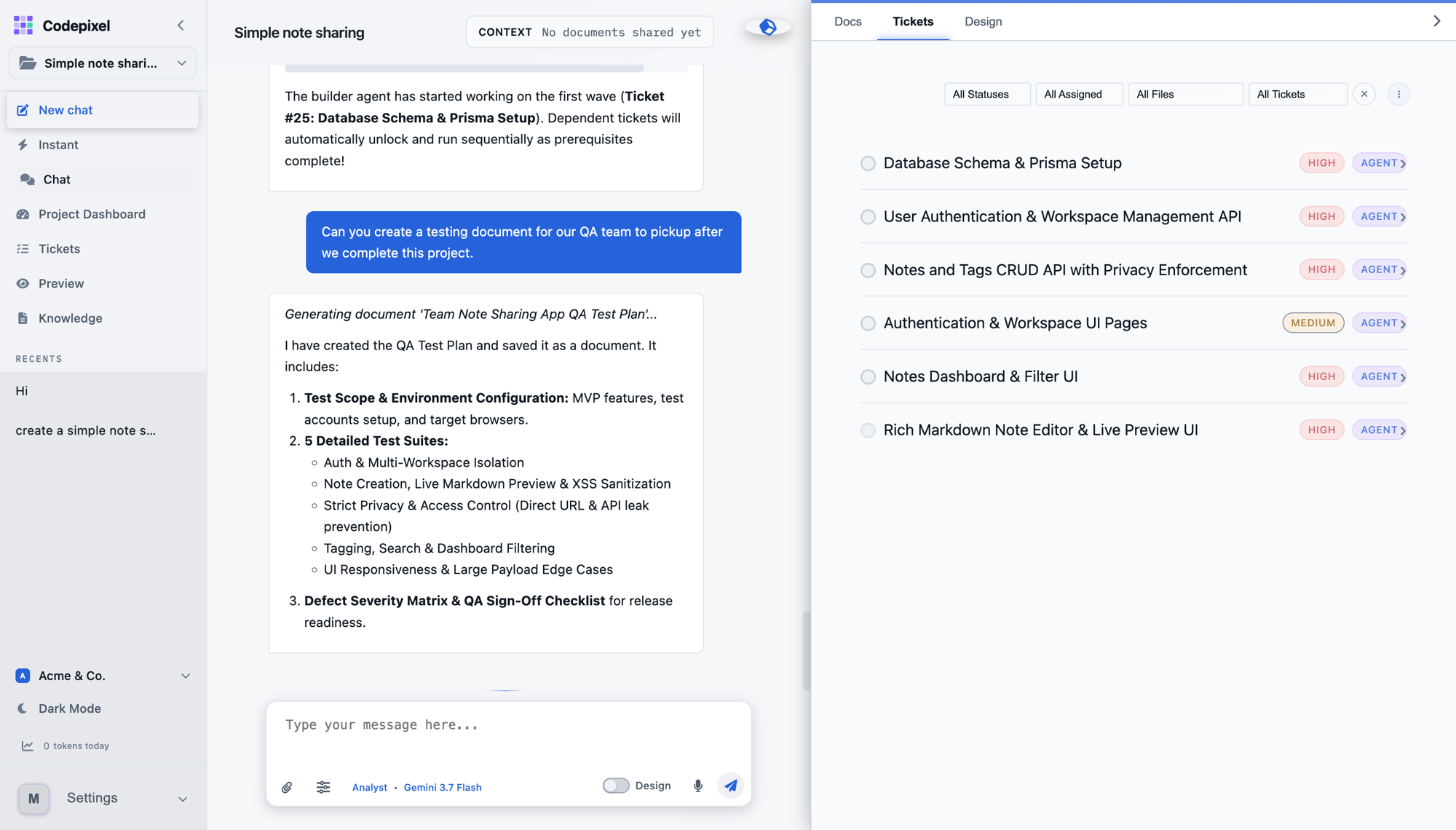
A Codepixel project workspace: the agent chat on the left, the project's ticket list on the right
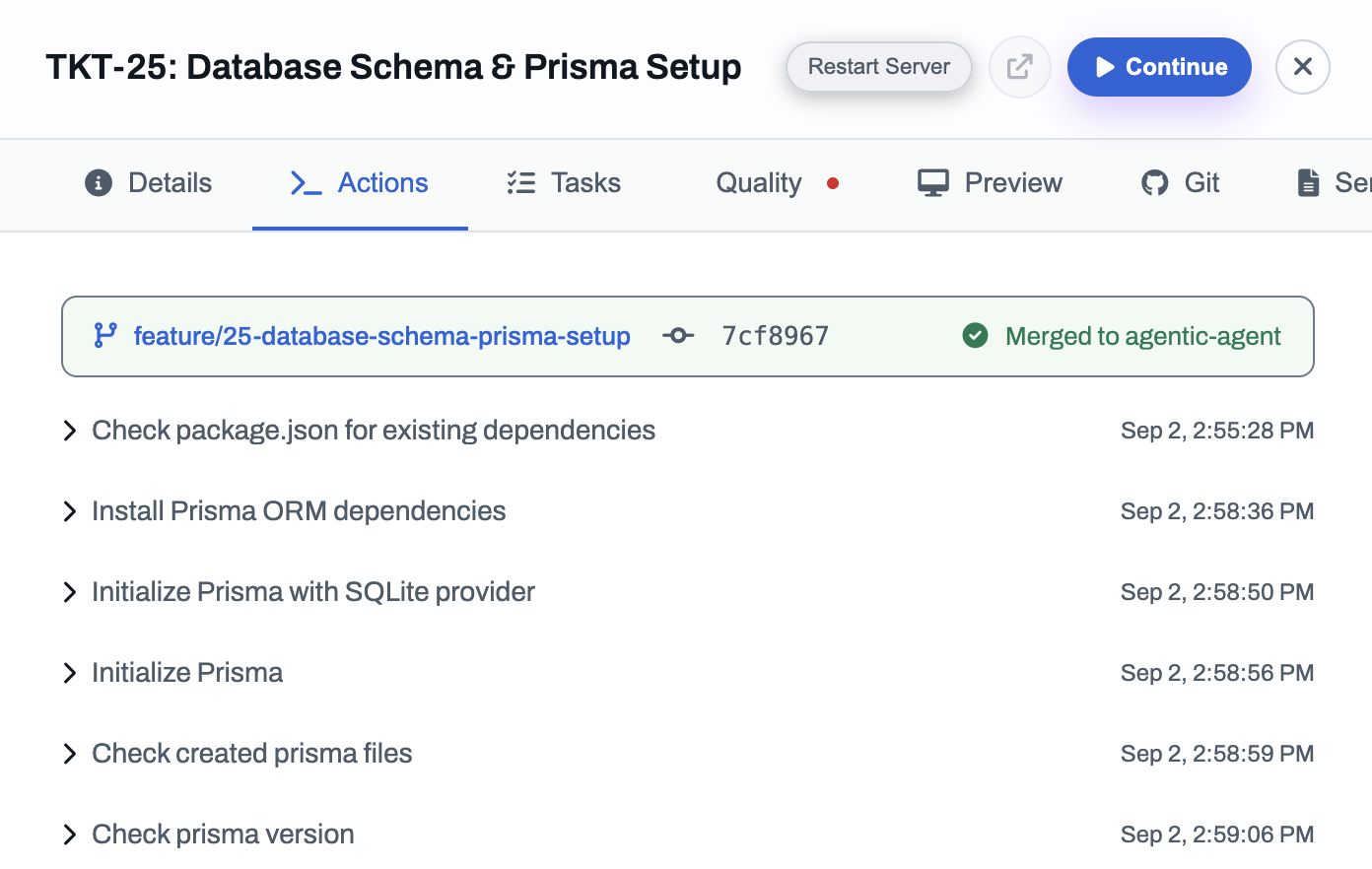
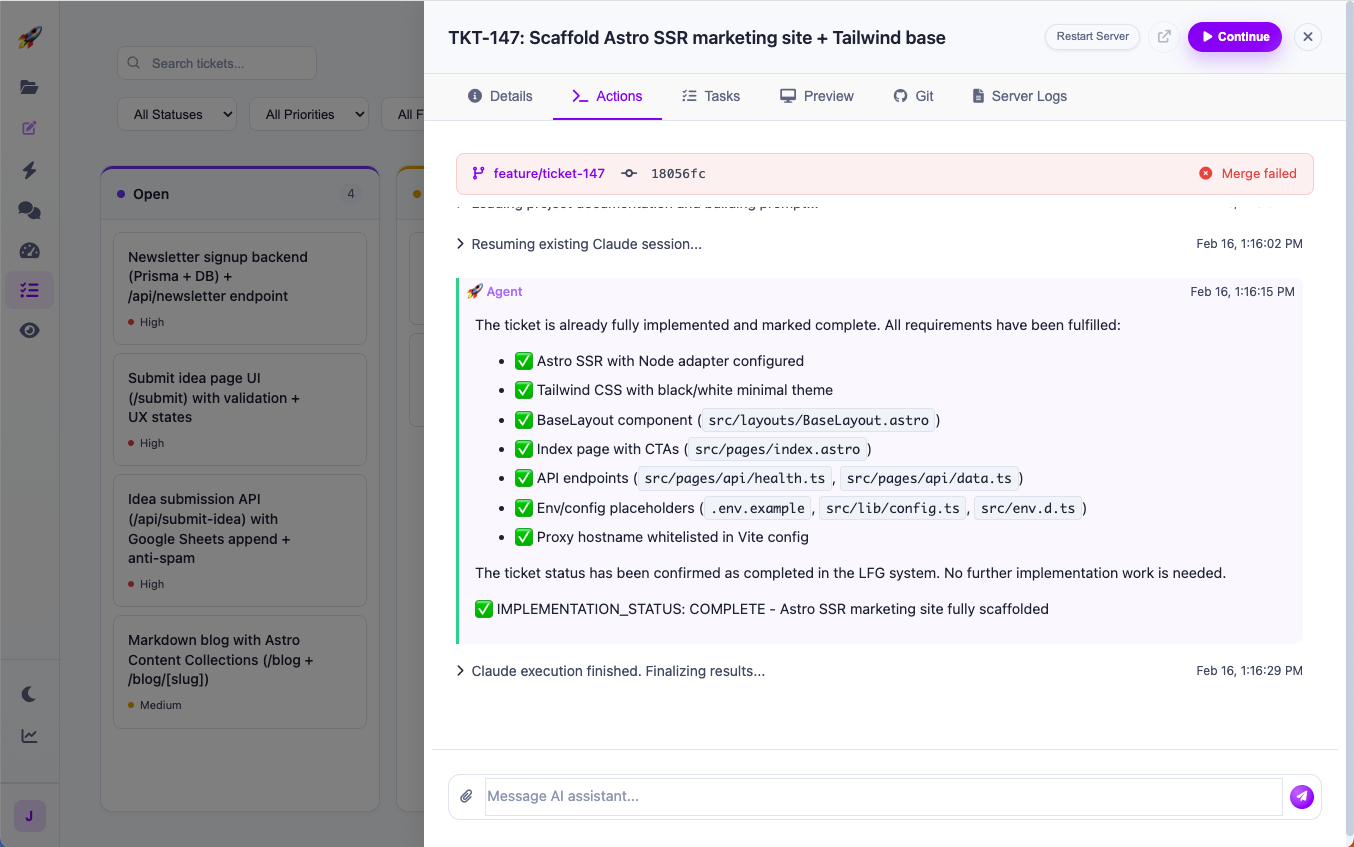
A ticket's action log: each step the agent took, and the branch merged at the end
Works with the stack your team already runs
GitHub
GitLab
Bitbucket
Jira
Linear
Slack
Notion
Why Codepixel

Writing the code was
never the slow part.

Generation stopped being the constraint. What still takes a week is everything around it — and that is what Codepixel automates.

Working with a coding assistant

Starts fromA prompt you write
Knows aboutWhat fits in one session
Works onThe file in front of it
RunsOne task at a time
Checked byYou, in review
ProducesA diff
Used byOne developer, in their editor
Held together byYou

Codepixel

Starts fromA business requirement
Knows aboutThe PRD, design and spec, on every ticket
Works onA dependency-ordered plan
RunsMany agents, in isolated workspaces
Checked byA gate, against the acceptance criteria
ProducesPlan, tickets, code, tests, preview, PR
Used byYour whole team, in one workspace
Held together byThe system — you hold the gates
The delivery cycle

From requirement to release.

Eight stages, one workspace. Agents do the work at every stage and hand back something a person can read — and nothing moves to the next stage until your team says it can.

  1. 01

    Requirement

    A business goal in plain English, or an issue already sitting in your Jira backlog, read against the system it has to fit into.

    ProducesIndexed repository and document context

    Your teamAnyone on the team can raise one. Scope is agreed before planning starts. Open to the team
  2. 02

    Plan

    PRD and acceptance criteria, every claim cited back to a source document.

    ProducesA PRD a reviewer can argue with

    Your teamProduct and engineering read it, edit it, and say what “done” means. Approval required
  3. 03

    Design

    Screens for each feature on a canvas, web or iOS — skipped, with a reason, for work with no UI.

    ProducesClickable screens and a design system committed to the repo

    Your teamYou approve the screens. Every UI ticket is then built to them. Approval required
  4. 04

    Architecture

    Implementation strategy, dependencies and the risks worth naming.

    ProducesTechnical analysis and stack decisions

    Your teamAn engineer approves the approach before a single ticket is written. Approval required
  5. 05

    Tickets

    The plan cut into work and ordered by what it depends on.

    ProducesA dependency-ordered execution graph

    Your teamThe lead can reorder, split, merge or drop tickets before agents start. Approval required
  6. 06

    Build

    Coding agents run in parallel, one isolated workspace per ticket.

    ProducesBranches, commits and a running preview

    Your teamAnyone can open a run, read every command it went through, and stop it. Open to the team
  7. 07

    Verify

    Tests, QA and the acceptance criteria — a failure goes back to the agent.

    ProducesTest run, QA report and a checked criteria list

    Your teamQA reads the evidence rather than the diff. Only passing work reaches review. Open to the team
  8. 08

    Release

    Everything a reviewer needs to say yes, gathered in one place.

    ProducesPull request, documentation and release trail

    Your teamAn engineer approves the pull request. Nothing ships without that. Approval required

Already have a backlog? Then you start in the middle. Connect Jira and your repositories and the issues arrive in a work inbox; pick one and Codepixel works out which repositories it touches and on what evidence, then builds it, checks it and opens the pull request. No PRD, no design stage, no re-planning work your team has already planned — the first five stages are for work that does not exist yet.

Every artefact above — the documents, the PRD, the architecture, the tickets, the agent runs, the test evidence and each approval — sits in one workspace your whole team can open, not in one developer’s editor.

Start with one requirement.

Run it end to end and compare against your current process.

Run a pilot →
What makes the plan trustworthy

The plan is grounded.
The work is checked.

An agent that only knows your prompt writes a plausible plan. These are the things that make the output answerable to your systems and your definition of done.

Grounded in your system

Your codebase, not just your prompt.

Point Codepixel at an existing repository and it indexes the code — every file chunked, typed by language and summarised into how the system actually fits together — and re-indexes as commits land. Share architecture docs and prior specifications alongside it (Markdown natively; PDF, DOCX, PPTX, XLSX and HTML through a converter), split along their headings. Plans are retrieved from that corpus rather than invented.

Context 4 documents · 21 systems known · 3 PRD sections unsupported
Multi-repository impact

Which repositories does this change touch?

The question a lead asks first about a ticket on an estate they did not write, and the one most tools cannot answer. Codepixel selects the repositories in scope and then shows the evidence for each: the files that import what is changing, and the services that consume a schema or a signature being altered — including the repository that never mentions the change by name and breaks anyway. Selection is kept separate from evidence on purpose, so a cheap guess is never dressed up as a finding.

In scope 3 repositories · 11 files implicated · 1 consumer, no direct reference
Cited PRDs

Every claim traces to a source.

Claims in a generated PRD carry a footnote that resolves to the exact passage supporting them, shown with its heading path so a reviewer can find it in the original document. A section the engine could not ground is counted as unsupported rather than quietly passed — the number is honest in the direction that costs us.

Settlement must continue to run through the existing ledger service.1

platform-architecture.pdf Services › Ledger › Settlement
Quality gate

“Done” is something a machine checked.

Before a ticket can reach review it passes three stages, cheapest first, stopping at the first failure. When it fails, the ticket goes back to the agent with the reason — not onto your review pile.

  1. 1 Baseline. The dependency manifest is committed, dependencies install from a clean checkout, and the app answers on its port.
  2. 2 Criteria. The runnable check attached to each acceptance criterion.
  3. 3 Judge. A second model reads the evidence and may only fail a ticket, never pass one — and it is never the model that wrote the code.
It gets better at your codebase

A ticket you repaired becomes a rule.

When the gate rejects a ticket and the agent fixes it, what was wrong is worth more than the fix. Codepixel records it as a candidate rule, and a person keeps or discards it at the review gate — nothing reaches a later build on the model’s own say-so. Kept rules join the conventions drafted from your code when the repository was first read, so the second ticket in a codebase starts where the first one finished.

Teams with domain knowledge that is not in any repository can add it as a skill pack: a folder of plain markdown, versioned alongside the project, that the agent reads before it plans. Insurance rules are not code, and they should not have to be.

After it ships

Verified against the thing that is running.

The quality gate checks a ticket in a sandbox, before it merges. That is not the same question as whether the deployed application does what the issue asked, and one cannot stand in for the other. Codepixel derives a probe from each acceptance criterion and runs it against the live environment after release, so the ticket closes on evidence from production rather than on a merge.
Not a black box

Open the workspace
the agent is working in.

A run is a live environment, not a transcript. You can walk into it while the ticket is still going.

An agent executing a ticket, with live logs
Live

A terminal, a preview and an undo.

Reviewing agent work by reading a diff is guesswork. Every ticket keeps a running sandbox you can open, so you can check the thing itself rather than the description of it.

  • ✓ A terminal straight into the running sandbox
  • ✓ The application itself, running, at any ticket
  • ✓ File browser with version history on every file
  • ✓ Every command, tool call and diff the agent produced
  • ✓ One-click revert of a merged ticket, with its history kept
Built for a team

Not a seat.
A place your team works.

Codepixel is an organisation, not a personal tool. Invite the people who already work on the product — product, engineering, QA, design — and they land in the same project, with the documents, the PRD, the designs, the tickets, the runs and the approvals already in it.

  • ✓ Organisations, email invitations and four roles
  • ✓ A work inbox of your Jira issues, syncing both ways
  • ✓ Linear, Slack and Notion through the same connector
  • ✓ Uploaded documents come in as grounded context
  • ✓ A REST API and per-user API keys for everything else

Who can do what

OwnerEverything, including deleting the project
AdminManage the project, invite people, approve work
MemberChat, tickets and files — cannot invite
ViewerReads everything, changes nothing
From the orgAn org role applies to every project it owns
Per personNarrow any role further, member by member
Enterprise fit

Configured around how your company ships.

Not a fixed workflow. Configure it around your systems, policies, approval chain and deployment environment.

Custom integrations

GitHub, GitLab, Bitbucket, Jira, Azure DevOps, CI/CD, security scanners and internal systems.

Custom gates

Architecture review, security sign-off, QA, UAT, change management or client approval.

Custom agents

Specialized agents for your frameworks, standards, domains and engineering practices.

Private deployment

Dedicated cloud, customer VPC or stricter self-hosted patterns for sensitive environments.

Security

Agents get access.
They do not get trust.

An agent that can write code can also read everything around it. Codepixel is built on the assumption that a run will go wrong: least access, isolated execution, and a person at every step that carries consequence.

⌁

Isolated execution

Every agent run gets its own container and its own checkout. Nothing is shared between tickets, projects or customers, and the workspace is destroyed when the run ends.

↗

Scoped repository access

Codepixel uses the Git credentials you grant, on the branches you allow. Revoke the grant and every future run stops with it — there is no second path into your code.

•••

Encrypted secrets

Project environment variables are encrypted at rest, decrypted only inside the run that needs them, and masked wherever they would otherwise be displayed.

◆

Your model keys, your provider

Bring your own keys. Prompts and code go to the provider you chose — Anthropic, OpenAI, Google or xAI — under your account and your terms with them, not pooled through ours. Connect a Claude Code subscription instead and builds run through that.

✓

Humans at the gates

Agents produce work and stop. Architecture, review, security sign-off and release are gates you place, and no agent can move work past one on its own.

◓

Every command is classified

Before the agent runs a shell command it is read and graded. Listing files and running tests are one thing; installing a package or writing a migration another; pushing a branch or reaching a host outside the sandbox another again. You choose which grade runs unattended.

△

A floor you cannot lower

Autonomy is set by your organisation, then narrowed per project and per repository — never widened. A team can tighten what agents may do on the repository they own; nobody can loosen what the organisation decided, including an administrator in a hurry.

≡

Every action is recorded

Requirement, plan, ticket, each command an agent ran, each diff, each test result and each approval — recorded and queryable after the fact.

◎

Deployment you choose

Shared cloud, a dedicated instance, your own VPC, or a stricter self-hosted pattern where the environment cannot leave your perimeter.

↺

Failure is assumed

A failed check sends the ticket back to the agent with the reason rather than onto a reviewer’s pile, and a second model may only fail work, never approve it.

Deployment architecture, data-processing terms and a security questionnaire response are available for your review during a pilot. Request the security pack →
Your questions, answered

Before you start.

What engineering teams ask before running their first real requirement.

Does this work on our existing codebase? +

That is the normal case. Codepixel indexes the repository you point it at and plans against what is already there — the stack, the structure and the decisions you have already made. It is not limited to new projects.

Do we have to use the generated designs? +

No. Design is a stage you can skip, with the reason recorded, for backend work or an API. When you do use it, you approve the screens and the design system is committed to the repository, so every UI ticket is built to the thing you approved.

How do our engineers stay in control? +

Half the stages stop for an explicit approval, and you decide which. Agents produce work and stop; nothing reaches the next stage, or your main branch, without a person.

Can the whole team use it, or only engineers? +

The whole team. Projects belong to an organisation, people are invited by email, and four roles decide what each of them can do — from full ownership down to read-only. Product, QA and design work in the same project as the engineers.

Which models can we use? +

Bring your own keys or use a managed setup, and switch models on capability, compliance or cost without rebuilding your delivery process.

How do we evaluate it properly? +

Give us one real requirement, feature or backlog item rather than a demo, and compare delivery time, engineering effort and quality against your current process.

Start with one real requirement

Run a pilot.

Tell us what you need built. We reply with how Codepixel would run it, and what you would be comparing it against.